Advanced options
None of these settings are needed for normal use. The defaults are almost always right. You can reach them in the second step of the backup.
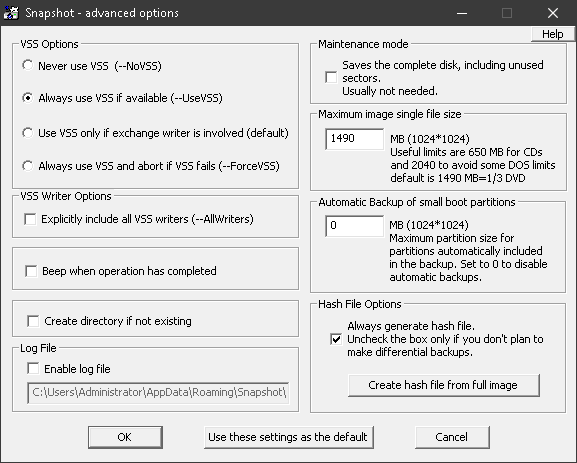
What you can configure
VSS options
Forces or prevents the use of the Windows Volume Shadow Copy service. More on this on the previous website under VSS.
Maximum size of a split file
Images get large, but should not exceed a certain size: under DOS the limit is 2047 MB, on CD-R 650 to 900 MB, on an ISO DVD 2048 MB. Snapshot therefore splits them into .SNA, .SN1 … .SN9, .S10 … .S99, .100 and so on.
With the default value of 1500 MB, three parts fit on one DVD. A value of 0 creates a single file.
Maintenance mode
Useful before you work on the disk with a data recovery program, for example because you deleted files you still need. The file system information is then no longer accurate. In maintenance mode, Snapshot backs up and restores all sectors, whether used or not.
Hash file
Every full backup creates a hash file. It is needed for differential images. If you do not use differential images, you can turn it off here. Create Hash file from full image recreates a lost hash file.
Log file
If you wish, Snapshot writes a log. The setting takes effect only at the next start.
Save as default
The settings either apply only to this backup or are saved as the default.