Skip to content
DriveSnapshot

Drive Snapshot 1.51Disk imaging for Windows

An image of your hard disk while Windows keeps running.

Drive Snapshot backs up entire partitions to an image file. No reboot, no installation, and you keep working while the backup runs.

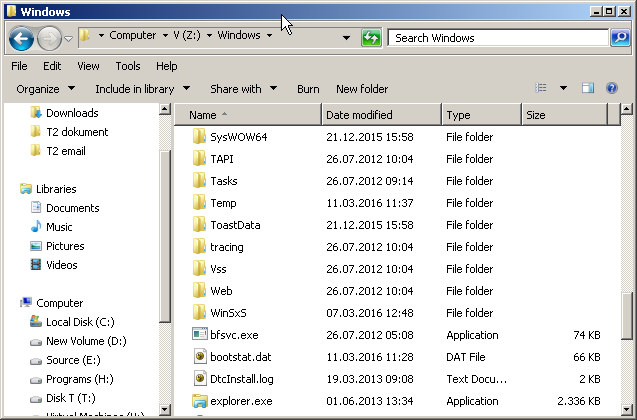
Drive Snapshot start window with the buttons Backup Disk To File, Restore Disk from File, Restore complete Disk from Images and View contents of saved Disk Image
The start window. Four buttons, and that is the whole interface.
Program
snapshot.exe, approx. 1 MB
Installation
none
Memory
32 MB while running, 0 MB otherwise
Trial license
30 days free, order in the shop

The cut after ten seconds

Backing up a running system has a catch: programs keep writing while the backup is in progress. In the end, the file contains part of the state from the start and part from the end. That is why classic imaging programs reboot into DOS, and classic backup programs simply skip open files.

After it starts, Drive Snapshot spends a few seconds gathering information about the drive and flushing cached data to disk. Then it freezes that state. If a program wants to write after that, Snapshot first backs up the old data and only then lets the program continue.

The image reflects the state at the start of the backup, plus about ten seconds. Anything you delete, change or install after that is not included.

  1. t = 0 s Start backup Snapshot reads the partition data and flushes the write cache.
  2. t ≈ 10 s Cut The blue bar appears in the progress window. From now on, the state is frozen.
  3. t > 10 s You keep working When a program writes, the old sectors go into the image first.
  4. End Image complete Consistent, even for databases and open files.

What the program does

F.1

Backup

One partition, several, or the whole disk. The file is compressed and contains only used sectors, so the image is about half the size of the used space. PAGEFILE.SYS and HIBERFIL.SYS are left out, since they hold nothing useful after a restore.

The target can be a local disk, a network drive such as \\Server\Backups, or an FTP server. If you like, the image can be encrypted with a password.
Backup step by step
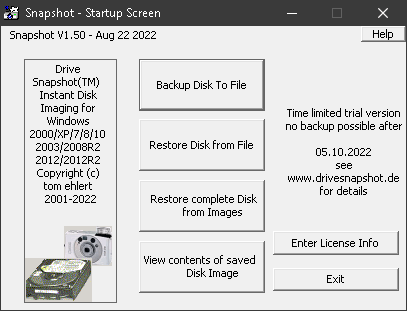
Progress window of a running backup of drive E: with the Volume Shadow Copy log
Backup in progress: progress, throughput, log.

F.3

Image as a drive

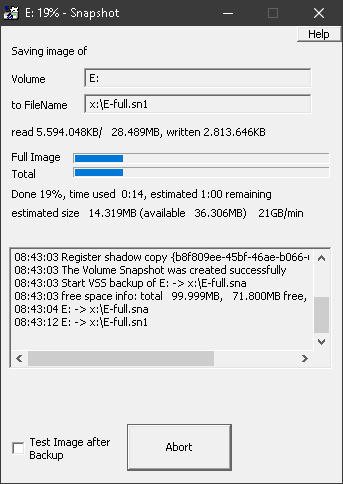
Instead of extracting individual files from an archive, Snapshot turns the image into a virtual drive, such as Z:. You work with it in Windows Explorer or any other program: search, compare, copy back via drag and drop.

The drive has the same security settings as the original. Up to five images can be mounted at the same time.

More about the Image Explorer
Windows Explorer showing the Windows folder on virtual drive Z:
An image mounted as drive Z: in Windows Explorer.

Where it runs

Snapshot accesses the drive through Windows. Whatever Windows can read, Snapshot can back up, including software and hardware RAID.

WindowsXP, Vista, 7, 8, 8.1, 10, 11
Windows Server2003, 2008, 2008 R2, 2012, 2012 R2, 2016, 2019, 2022, 2025
Other environmentsWindows PE, x64, ARM64 (separate build)
File systemsFAT16, FAT32, NTFS, ReFS
Linux: EXT2, EXT3, EXT4, ReiserFS, XFS
Hardwareall local disks (IDE, SCSI, USB …) with 512-byte or 4K sector size, any RAID configuration
RequirementsAdministrator rights, 3 MB of disk space for installation
Not as a sourceNetwork drives. They do work as a backup target.
Older systemsVersion 1.49 is available for Windows NT4 SP6 and Windows 2000.

Try first, then buy

To test the software, order a free 30-day trial license at shop.ondeso.com. After these 30 days, only restore and the Image Explorer keep working; backup does not. So your images remain readable even if you do not buy.

Snapshot runs without installation. It copies no files into the Windows directory and makes no changes to the system configuration. If you prefer a classic installation, use Setup.exe.

Running it requires administrator rights.

One license per machine

The license you need depends on the operating system: Workstation for Windows desktops, Server for Windows Server. Commercial covers any business use and includes updates and e-mail support. The Private license applies only to personal computers and includes updates but no support.

Prices including VAT
Commercial12 months Commercial36 months Private60 months
Workstationone Windows workstation €20.23 net €17.00 €54.74 net €46.00 €39.00 incl. VAT
Serverone system running Windows Server €45.22 net €38.00 €120.19 net €101.00 €89.00 incl. VAT
  • The term starts on the date of issue. There is no automatic renewal; to continue using the software, you buy a new license.
  • Your license data is sent by e-mail within two business days of receipt of payment. How to enter it is described under Enter license.
Go to the ondeso Shop

From Aachen, part of ondeso since 2026

Tom Ehlert founded Tom Ehlert Software in October 2000 to experiment with real-time disk imaging. The result was Drive Snapshot, released to end users in the third quarter of 2002.

Since 2026, Drive Snapshot has been part of the product family of ondeso GmbH in Regensburg, Germany. ondeso acquired the software together with the Everfield Group after a long-standing technical partnership. Licenses are available in the ondeso Shop.

ondeso GmbH

Osterhofener Str. 16
93055 Regensburg

+49 941 462932-0
contact@ondeso.com